
Prior to actually sending the mailing to all recipient email addresses, i.e. sending the prepared deliveries, you may want to test the mailing. Follow the Proof/Test Email link on the mailing view page.
Testing the Mailing

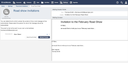
On the Proof/Test Email page, you can view the email as it would be generated for the contact person chosen on the left hand side. Clicking the Send Proof Email button causes the personalized email to be sent to your own email address, not to the address of the selected contact person.
Sending proof emails does not release the mailing. Feel free to test the mailing preview with as many contacts as you like prior to releasing the mailing.