
The Settings page lets you access and change your personal settings. As a superuser, you can also change the system settings. To open the Settings page, click the icon depicting a person at the upper right corner, then select Settings from the submenu:
Personal and System Settings

The Settings page consists of three sections, your personal settings, system settings, and an overview of the amount of data stored in the CRM:
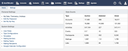
Personal Settings
The Personal Settings section lets you access your CRM entry, change your password, and generate an API key. The latter is required for using the CRM web services, e.g. from within a web application.
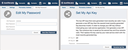
If you are already using an API key and need to change it for some reason, please carefully read and adhere to the instructions provided on the corresponding dialog page. After generating a new API key, you need to copy it immediately from the page and store it in a secure place because the CRM intentionally offers no way to have an existing key redisplayed.
System Settings
The CRM lets you customize various internal aspects if you are a superuser:
- User Roles: Grant permissions to contact persons.
- Type Configurations: Customize activities and events to tailor them to your use cases.
- Templates: Provide or customize templates available for mailings and notifications.
- Mailing Topics: Manage topics users can subscribe to or unsubscribe from.
- Sender Email Addresses: Register sender email addresses for use with your mailings and notifications.
- Recipient Email Addresses: List recipient email addresses based on their general consent to receiving mailings and their subscriptions.
- Google Calendar Configuration: Synchronize activity appointments with a Google calendar.